Choose by task and output

Claude Excel Skills: Clean CSV and Create Editable XLSX

An Excel skill should hand you a useful workbook, not only a text explanation. Start with a small CSV cleanup task, preserve the original input and check that formulas respond to edits.

By OpenAgentSkill · Source notes checked · Guide updated

Start with the job you need done

Compare the source, output and setup

The comparison describes the pinned upstream instructions. It does not assign new review scores or imply successful installation. Inspect the pinned instructions and available registry profiles before choosing.

1 source-backed workflow · Scroll horizontally on smaller screens.
Skill / taskOutputSetupLimits
Anthropic XLSX

Clean data and create editable spreadsheets

Pinned SKILL.md ↗
XLSX files with typed cells, formulas, formatting and chartsA coding runtime, spreadsheet libraries and a compatible recalculation / inspection pathCheck formula results and missing values. A CSV or screenshot is not an editable Excel workbook.

From a brief to a checked deliverable

  1. Keep the original CSV and define a record key and explicit cleanup rules.
  2. Normalize numbers and dates, remove only duplicates allowed by the rule, and leave missing values unavailable.
  3. Create a workbook with the cleaned table, review flags and a total for known values.
  4. Reconcile record counts and totals, change an input to check recalculation, and inspect the layout before delivery.
Read the task guide →

Examples you can inspect

These original editorial fixtures demonstrate the deliverables and checks to ask for. Their production notes identify how they were made; they are separate from upstream Skill instructions.

Messy CSV to an editable Excel workbook

Messy CSV to an editable Excel workbook

Input
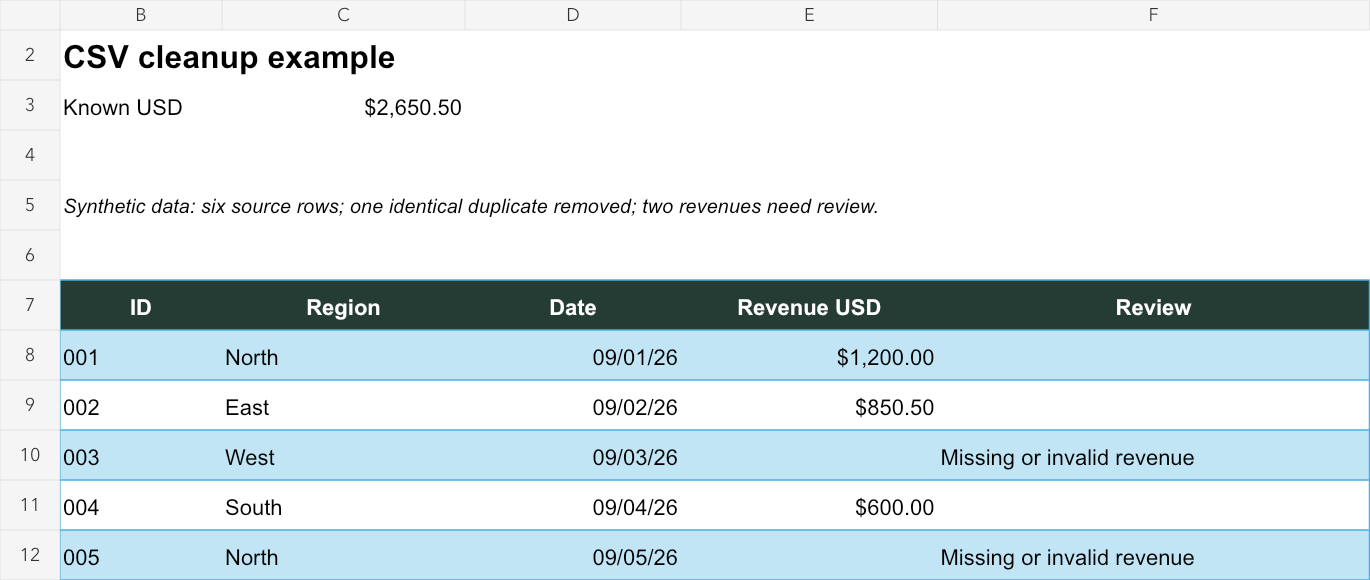
Six synthetic sales rows: padded labels, currency strings, one exact duplicate, a blank value and an invalid revenue value.
Output
Five unique records with typed dates and numbers, two review flags, a formula total and the preserved original CSV.

Known revenue reconciles to $2,650.50. Editing one revenue updates the total; missing values stay unavailable. Workbook structure and both sheet previews are checked.

Produced with a spreadsheet authoring library, not a claimed runtime test of every listed XLSX skill. Native Excel was not executed.

Try the six-row CSV cleanup task

The linked downloadable example has an exact duplicate, mixed number formats and missing values. It gives you a small, inspectable first task for an Excel or XLSX skill.

Prepare these inputs

  • The original CSV, preserved unchanged.
  • A record key and explicit rules for duplicates, currencies, dates and missing values.
  • A workbook specification: sheet names, editable inputs, formulas and required charts.

A task brief for your agent

Use the supplied messy-sales.csv to create a new editable XLSX workbook. Keep the original input unchanged. Trim labels, parse valid dates and currency values, and remove only exact duplicate records. Do not replace missing or invalid revenue with zero; flag those rows for review. Keep the cleaned table, a review explanation and a formula total for known revenue. Reconcile input and output record counts. Save the workbook, reopen it, verify formulas with a calculation engine when available, and inspect its layout. State if recalculation or native Excel testing was not performed.

Review the brief and add your own inputs before running it.

Check the result

  1. For this fixture only: six input rows become five unique records, with two revenue values requiring review.
  2. Known revenue totals $2,650.50; blank and invalid revenue remain distinguishable from real zero.
  3. Edit an input and check the recalculated total. A written formula without a calculated result is not sufficient.

If the first attempt fails

The total is blank when another tool opens the file

The workbook may lack cached formula results. Recalculate in a compatible engine, reopen the saved file and verify both formula and value.

The total looks right but records disappeared

Compare row counts and the duplicate key. Similar names are not necessarily duplicate records.

Missing revenue became zero

Restore missingness and add review flags. A zero is a real value and changes the interpretation of the report.

Check your client's workflow

Codex, Claude Code and Cursor

Use the client's discovered skill name and preserve referenced scripts and files. Remotion explicitly lists these clients in its official guide; each other source has its own setup requirements.

WorkBuddy, Trae and CodeBuddy

Check the current client's custom-skill import, shell or file access and the selected source's documented support. Keep helper files together. Test one small input before treating a community workflow as compatible.

Doubao and chat-only workflows

Specify the actual product and its file or tool capabilities. A conversation can help draft a brief; producing editable files or running a local code skill requires the corresponding supported runtime.

Common questions

What does a Claude Excel skill produce?

The source XLSX skill focuses on spreadsheet files: opening or editing them, cleaning CSV or TSV, creating formulas and formatting, and exporting a workbook. Your runtime still needs the required libraries.

Should blank or invalid numbers become zero?

Only when the task explicitly defines that rule. In the example, missing and invalid revenue stays blank with a review flag, and the total covers known values only.

Can I use this spreadsheet workflow with Codex?

The file-processing task can be adapted to another coding runtime, but inspect that client's skill setup and local libraries first. This release does not establish client-by-client runtime compatibility.

Continue with a focused workflow