Choose by task and output

Claude PDF Skills: Parse Text, Extract Tables and OCR Scans

First check whether the PDF contains selectable text. Digital extraction, scanned-page OCR and table reconstruction need different operations and checks. Visual PDF creation is outside this parsing shortlist.

By OpenAgentSkill · Source notes checked · Guide updated

Start with the job you need done

Compare the source, output and setup

The comparison describes the pinned upstream instructions. It does not assign new review scores or imply successful installation. Inspect the pinned instructions and available registry profiles before choosing.

1 source-backed workflow · Scroll horizontally on smaller screens.
Skill / taskOutputSetupLimits
Anthropic PDF

Read, extract, OCR and assemble PDFs

Pinned SKILL.md ↗
Extracted text or tables, searchable PDFs, or generated PDF filesThe source's Python / CLI dependencies; OCR needs an OCR engineScans require OCR. Table structure and reading order must be checked against page images.

From a brief to a checked deliverable

  1. Inspect a representative PDF page and determine whether text is selectable.
  2. Use the source's digital extraction tools, or its OCR path for scanned images.
  3. Keep page numbers and source references with the extracted content; do not silently replace missing text.
  4. Reconcile table rows and numeric totals and check reading order before writing markdown or importing into RAG.
Read the task guide →

Examples you can inspect

These original editorial fixtures demonstrate the deliverables and checks to ask for. Their production notes identify how they were made; they are separate from upstream Skill instructions.

A PDF table with reconciled CSV and JSON

A PDF table with reconciled CSV and JSON

Input
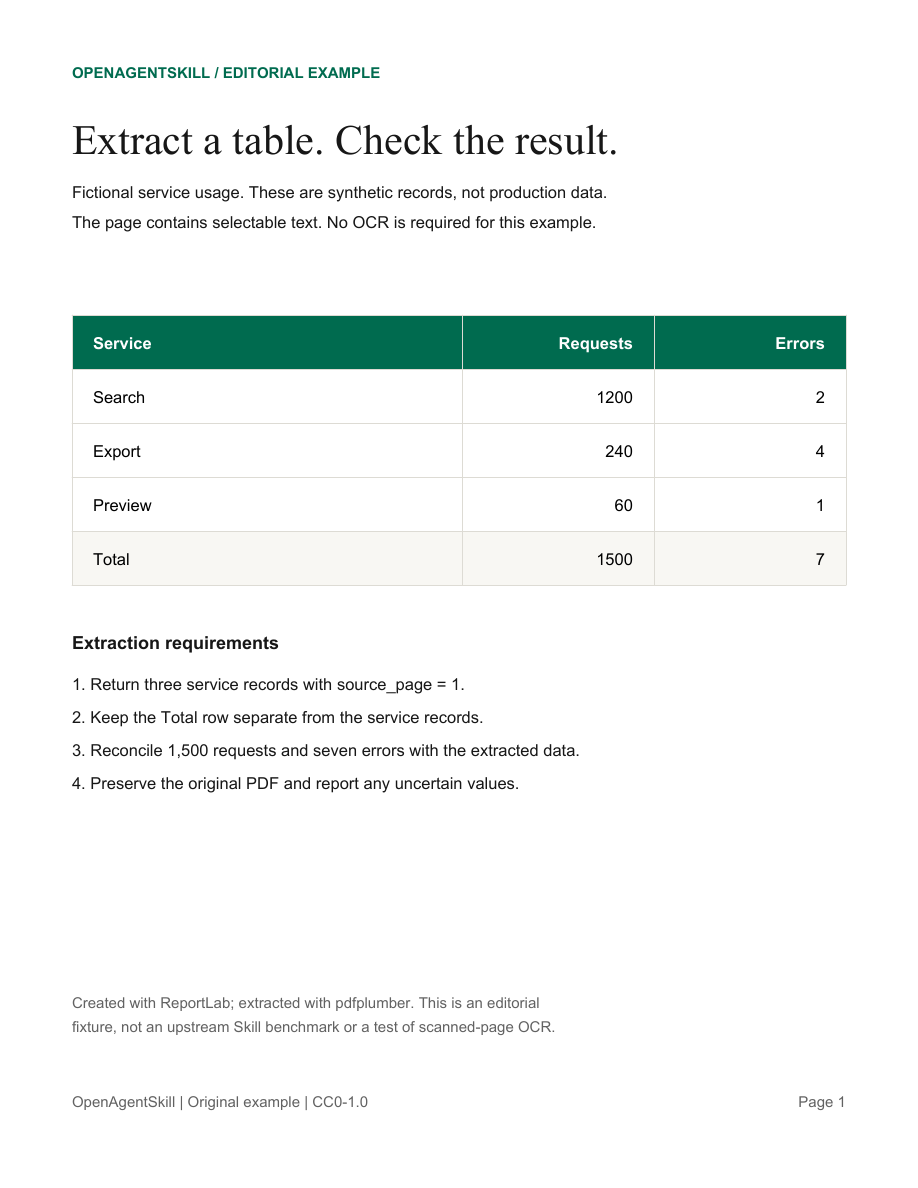
An original one-page PDF with selectable text, three synthetic service records and a separate Total row.
Output
Three extracted records with page references: 1,500 requests and seven errors, in CSV and JSON.

Created with ReportLab and extracted with pdfplumber. Extracted cells are compared with the source table and totals are recomputed; the page is rendered with Poppler for inspection.

This digital PDF example does not test OCR on scans, complex merged tables or any upstream Skill runtime.

Extract one PDF table and reconcile it

Try the linked original, synthetic service-usage PDF. Its selectable text and three-row table provide a reproducible extraction task before you tackle a long report or scanned document.

Prepare these inputs

  • A PDF you can process, plus the page range and required columns.
  • Whether text is selectable; image-only scans need a separate OCR step.
  • A target format and a rule for keeping page references, units and unreadable values.

A task brief for your agent

Extract the service-usage table from the supplied PDF into CSV and JSON. First determine whether the page has selectable text. Keep the service name, requests, error count and source page for each data row; keep the Total row separate from the records. Preserve units and report ambiguous or missing values rather than guessing. Reconcile the number of rows and both totals against the PDF, and visually compare the table with the page. If OCR is required, disclose that step and its uncertain characters. Return the original file, extracted data and a short validation report.

Review the brief and add your own inputs before running it.

Check the result

  1. For this fixture: three service records, 1,500 requests and seven errors; the Total row is not a fourth service.
  2. Each extracted record retains source page 1 and the correct column meanings.
  3. Compare the original page with the CSV and JSON. This example does not establish OCR accuracy on scans.

If the first attempt fails

Text extraction returns nothing

Check whether the page is an image. Use OCR for a scan, and inspect uncertain digits and page orientation.

Numbers move into the wrong columns

Compare the table grid and headings with the page. Multi-column layouts and merged cells need explicit reconstruction.

Totals double after extraction

Check whether the summary row was included as a normal record. Keep totals separate and reconcile once.

Check your client's workflow

Codex, Claude Code and Cursor

Use the client's discovered skill name and preserve referenced scripts and files. Remotion explicitly lists these clients in its official guide; each other source has its own setup requirements.

WorkBuddy, Trae and CodeBuddy

Check the current client's custom-skill import, shell or file access and the selected source's documented support. Keep helper files together. Test one small input before treating a community workflow as compatible.

Doubao and chat-only workflows

Specify the actual product and its file or tool capabilities. A conversation can help draft a brief; producing editable files or running a local code skill requires the corresponding supported runtime.

Common questions

Why does PDF text extraction return nothing?

The page may be an image scan rather than digital text. Check the page visually and use OCR when needed. Extraction can also fail on unusual encodings or protected files.

Which skill should I use for PDF to markdown?

Start with extraction that fits the input, verify its reading order and tables, then convert the result. The PDF workflow is the primary source here; a converter library is a dependency, not automatically an installable agent skill.

Does this page prove OCR accuracy?

No. It describes the pinned source workflow and the checks required. This release does not include a comparative OCR runtime test.

Continue with a focused workflow