github-dashboard
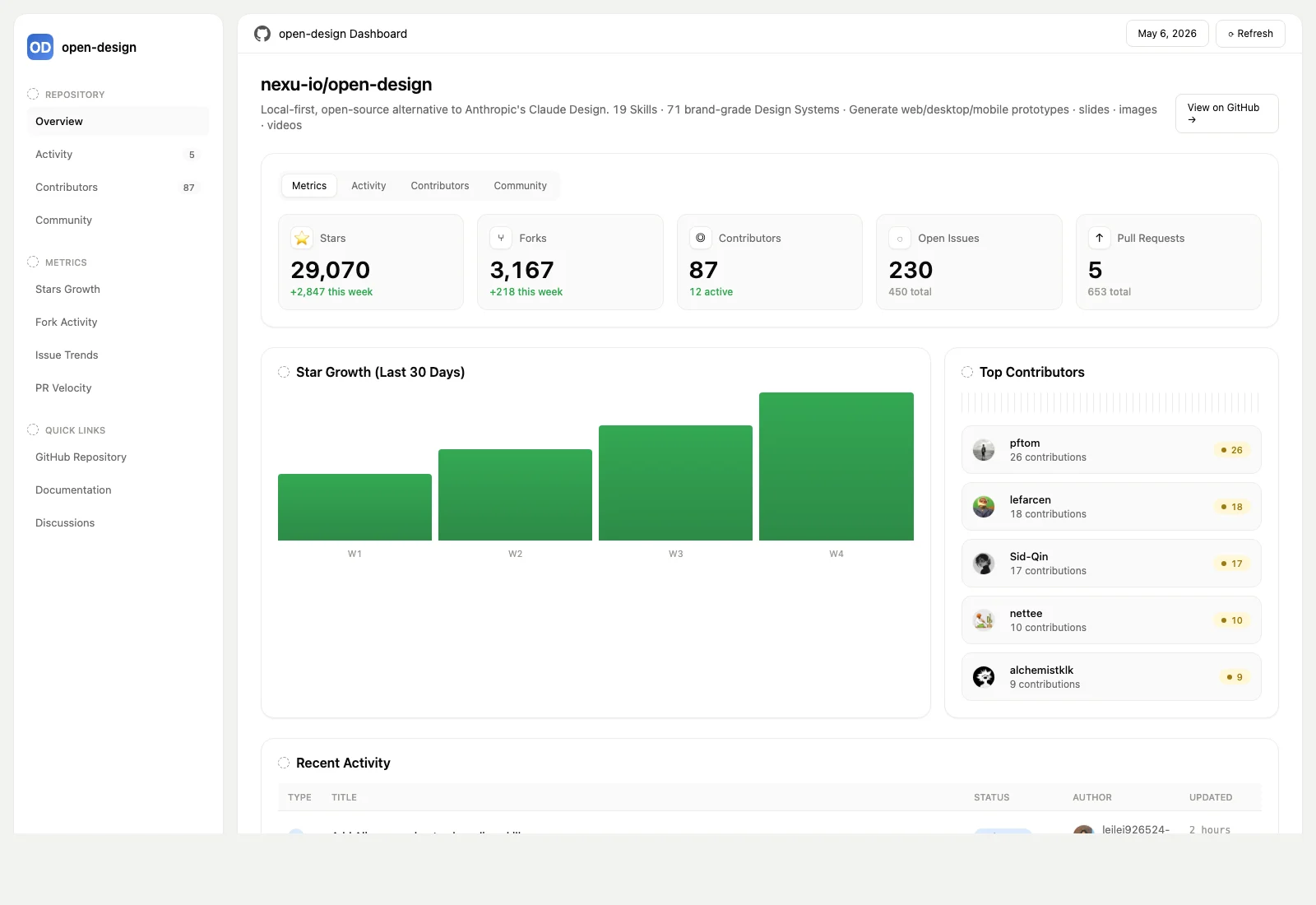
GitHub repository analytics dashboard — stars, forks, contributors, issues, pull requests, recent activity, and top contributors. Use when the brief asks for a GitHub repo dashboard, open-source growth report, repository health page, or GitHub analytics view.
nexu-io · 已有 AI 审核记录
安装与使用
运行命令前先阅读来源与依赖说明。复制命令不会自动安装或执行。
npx skills add nexu-io/open-design --skill github-dashboard技能说明
name: github-dashboard description: | GitHub repository analytics dashboard — stars, forks, contributors, issues, pull requests, recent activity, and top contributors. Use when the brief asks for a GitHub repo dashboard, open-source growth report, repository health page, or GitHub analytics view. triggers:
- "github dashboard"
- "repo dashboard"
- "repository dashboard"
- "github analytics"
- "open source dashboard"
- "github growth"
- "仓库看板"
- "GitHub 看板"
od:
mode: prototype
platform: desktop
scenario: operation
preview:
type: html
entry: index.html
design_system:
requires: true
sections: [color, typography, layout, components]
outputs:
primary: index.html
secondary:
- template.html
- data.json
- artifact.json
- provenance.json capabilities_required:
- shell
- file_write example_prompt: "Build a GitHub dashboard for nexu-io/open-design — stars, forks, contributors, issues, PRs, recent activity, and top contributors."
GitHub Dashboard Skill
Create a single-screen GitHub repository analytics dashboard in the FlowAI / Soft Paper Workspace visual style: warm off-white canvas, white rounded panels, a fixed left sidebar, compact KPI cards, pastel pills, dense tables, and low-contrast hairlines.
Resource map
github-dashboard/
├── SKILL.md
├── example.html                         ← rendered reference dashboard
└── references/
    ├── template.html                    ← live-artifact-compatible HTML template
    ├── example-data.json                ← normalized public GitHub data shape
    ├── artifact-example.json            ← minimal live-artifact create input
    └── provenance-example.json          ← safe source/provenance example
When to use this skill
Use this when the user asks for a dashboard or report about a single GitHub repository, for example:
- repository growth dashboard
- open-source project health report
- GitHub stars / forks / contributors analytics
- issue and pull-request activity page
- maintainer / contributor dashboard
If the user asks for refreshability, source auditability, or scheduled updates, produce the live-artifact source set (template.html, data.json, artifact.json, provenance.json) and follow the live-artifact contract. If they only need a visual artifact, produce a self-contained index.html.
Workflow
-
Resolve repository scope
- Parse
owner/repofrom the brief. - This v1 skill is scoped to one repository. If multiple repositories are requested, ask the user to pick the primary repository or create one dashboard per repository.
- If the repo is missing, ask one concise question for the GitHub URL or
owner/repo.
- Parse
-
Collect public GitHub data
- Prefer GitHub CLI/API for public repository data when available.
- Current stars/forks/watchers/open issue count:
GET /repos/{owner}/{repo}(stargazers_count,forks_count,watchers_count,open_issues_count). - Contributors: paginate
GET /repos/{owner}/{repo}/contributors?per_page=100&page=N, sort bycontributionsdescending, and take the top N used by the dashboard. If only page 1 is available, label totals as first-page estimates. - Issues: use GitHub Search API (
repo:{owner}/{repo} is:issue) for total counts, or paginateGET /repos/{owner}/{repo}/issues?state=alland filter out items with apull_requestfield. - Pull requests: use GitHub Search API (
repo:{owner}/{repo} is:pr) for total counts, or paginateGET /repos/{owner}/{repo}/pulls?state=alland count pages via theLinkheader. - Recent activity: combine the newest issues and pull requests, normalize them into display-ready rows, and cap the preview list at 5–10 items.
- Growth/delta metrics: GitHub REST does not expose complete historical star/fork deltas. Use GraphQL, stargazer event snapshots, the Events API where available, or explicitly mark deltas as estimated/synthetic in
provenance.json. - Do not store auth tokens, raw HTTP envelopes, cookies, rate-limit headers, or private metadata.
-
Normalize into dashboard data
- Required
repository:name,fullName,url,description,language,license,created,lastUpdated. - Required
metrics: stars, forks, contributors, issues, pull requests. Store display-ready totals plus small deltas or growth notes. - Required
contributors: top 5–8 contributors withlogin,avatar, andcontributions. - Required
recentActivity: display-ready rows withtitle,typeText,typeClass,label,labelClass,author,authorAvatar, andupdated. Do not rely on template conditionals for issue/PR switching. - Chart data can be synthetic only when GitHub does not expose the exact history; document the transformation in provenance.
- Required
-
Apply the visual system
- Use the active
DESIGN.mdtokens when present. - If no design system is provided, use the Soft Paper defaults reflected in
references/template.html:#F2F2F0canvas, white cards,#ECECEAborders,#0A0A0Aink, Geist/Inter typography, 256px sidebar, 48px topbar, and 16px card radius. - Keep color small and semantic: green for healthy metrics, amber for warning, blue for feature/PR labels, red only for defects or risk.
- Use the active
-
Lay out the page
- Shell: 256px sidebar + main panel, both white, rounded 16px, 1px hairline border.
- Topbar: repo context on the left, refresh/export/action affordances on the right.
- Header: repository name, description, and date/settings/actions row.
- KPI strip: 5 compact cards for stars, forks, contributors, issues, PRs.
- Main grid: 2fr/1fr split with a growth chart or activity table on the left and top contributors/health cards on the right.
- Footer: provenance/last-updated note in small muted text.
-
Write the artifact
- For a static artifact, write one self-contained
index.htmlwith inline CSS and no external JS libraries. - For a l
- For a static artifact, write one self-contained
先看看实际效果
作者为这套具体设计模板发布的预览。示例内容与界面功能未经本站独立测试。